You've got three briefs open, a product launch script due, a TikTok series waiting for hooks, and a blank cursor staring back at you. The problem isn't a lack of ideas. It's the slow assembly line between an idea, a usable script, a finished video, and a scheduled post.
The right AI script writing tool compresses that line. It helps you shape the hook, draft the spoken copy, add visual direction, create variations, and move the winning version into production. The wrong tool gives you a polished-looking paragraph that still needs a complete rewrite before anyone can record it.
Why Picking the Right AI Script Writing Tool Matters Now
Generative AI is already part of mainstream content production. An independent benchmark found that 71% of B2B marketers use generative AI for content production, while AI-augmented teams reduced the median time to create a first draft of a 1,500-word blog post from 4.6 hours to 1.1 hours, a 76% reduction (AI content production benchmark). Script production benefits from the same compression because a short video usually starts with the same sequence: idea, angle, hook, body, CTA, and production notes.
That adoption changes the buying question. You're not deciding whether AI belongs in your workflow. You're deciding whether a specific tool removes enough downstream work to justify another subscription, another login, and another place for your content to get stuck.
Start with workflow fit
Look at what happens before and after generation. A useful tool should accept the information your team already has, such as a campaign brief, audience profile, product details, platform, tone, and desired action. It should also preserve that context when you create variants instead of forcing you to restate the entire brief.
A tool that produces excellent text but exports only to a document may still create work. Your team then has to copy the script into an editor, rebuild scene timing, write captions, source visual assets, and recreate the CTA for every version.
Judge the draft by its edit burden
Raw cleverness is a weak evaluation metric. A script can have a catchy first line and still sound unnatural aloud, repeat the same claim, or provide no useful direction for the editor.
Test whether the output survives a light edit. Read it out loud. Check the rhythm. Remove the generic phrases. Ask whether a creator could record it without guessing where to pause, what to show, or which words should appear on screen.
Practical rule: A fast first draft is valuable only if it reduces the number of decisions left for the human team.
Inspect the handoff
Your final choice should connect to the rest of the production system. Check whether the tool can support your editor, asset library, approval process, scheduler, and performance review. If every finished script ends in a static document, you've automated ideation but not content operations.
This is why category rankings shouldn't decide the purchase alone. One independent comparison evaluated 27 tools, 28 head-to-head matchups, and 351 possible pairs. The top-ranked product scored 9.4, while the eighth-ranked product scored 8.4, a relatively narrow spread that makes workflow fit and editorial suitability more important than a small score difference (AI script-writing software comparison).
| Decision area | What to test | Why it matters |
|---|---|---|
| Workflow fit | Brief inputs, templates, saved context, team access | Prevents repeated setup work |
| Draft quality | Spoken rhythm, specificity, hooks, CTAs | Determines how much rewriting remains |
| Production handoff | Editor, captions, voiceover, assets, scheduling | Turns a script into a publishable video |
The Core Features Every AI Script Writing Tool Must Have
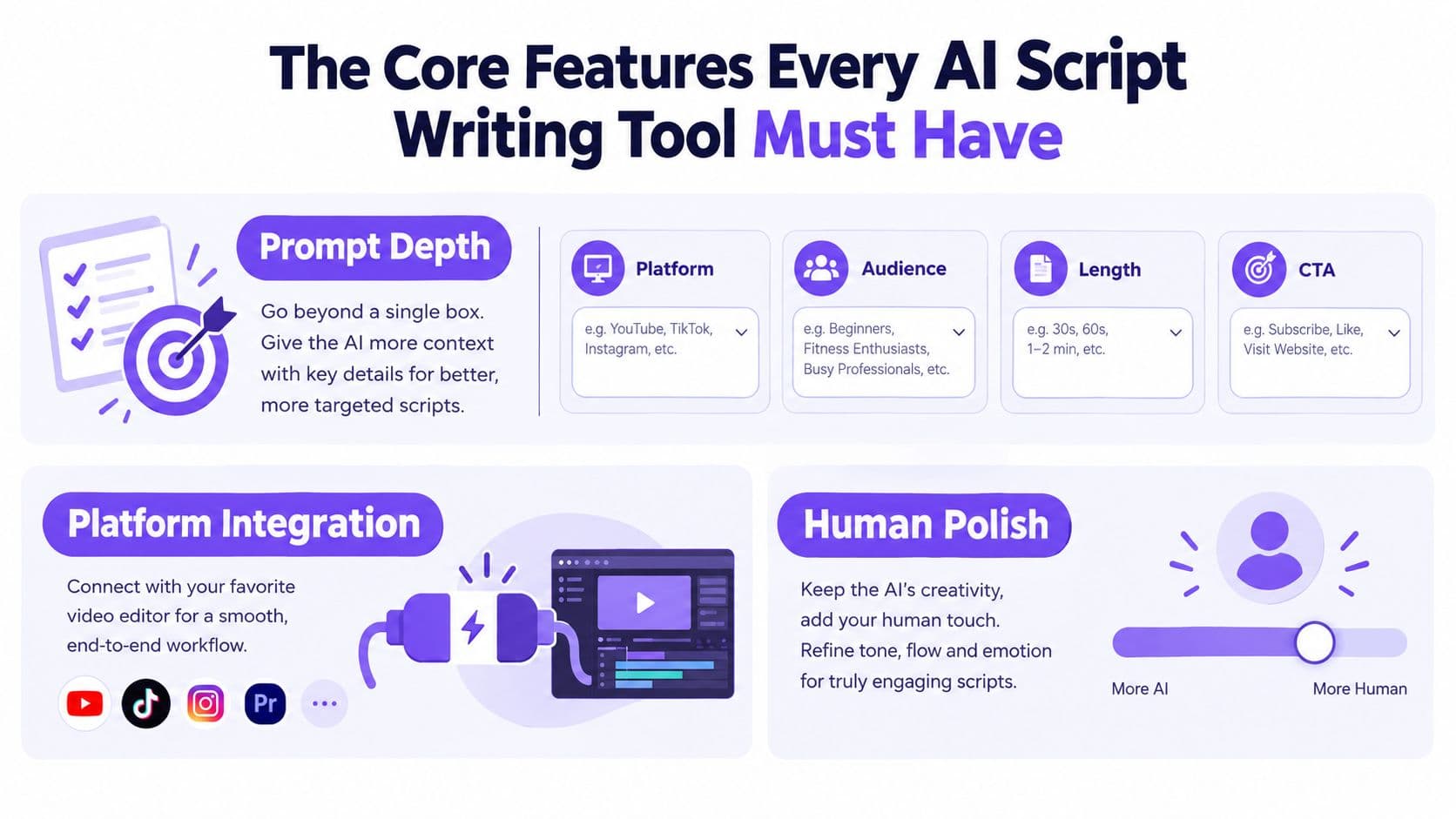
A serious script tool needs more than a large text box and a “generate” button. The practical difference appears in four capability groups: prompt depth, format awareness, retention logic, and iteration controls.
Prompt depth prevents generic scripts
A useful brief should let you specify the platform, audience, length, offer, hook style, visual context, and CTA. A single prompt field pushes all of that into one paragraph, which makes the output harder to control and harder to repeat.
Consider a direct-to-consumer brand creating paid UGC ads. The writer needs to know whether the speaker is a customer, founder, expert, or creator. It needs the product objection, the desired emotional angle, the opening pattern, and the action the viewer should take. Structured fields make those inputs visible and reusable.
You can use the AI script writer from Hooked as a reference point when auditing this category. The key question isn't whether a tool can generate a script. It's whether the tool exposes enough controls to generate a consistent family of scripts.
Format awareness changes the draft
A TikTok-style vertical script shouldn't read like a shortened YouTube essay. A UGC ad needs a believable personal setup, a product moment, proof, and a clear action. A podcast segment needs conversational transitions, while a sales video needs a different relationship between objection, evidence, and offer.
Look for templates that understand native pacing and production requirements. Strong templates should separate spoken dialogue, scene direction, on-screen text, B-roll, and CTA copy instead of blending everything into a paragraph.
Retention logic needs to be visible
The first line does a different job from the middle of the script. A good tool should support pattern interrupts, open loops, curiosity gaps, direct claims, demonstrations, and objection-led openings. It should also help you compare hooks without changing the core message.
Avoid tools that promise “viral” output without showing the logic behind the variation. Trend-aware scripting is useful when it gives you a repeatable format to adapt, not when it copies surface-level language from popular videos.
Iteration controls separate tools from toys
Regeneration should work at the beat level. You may like the hook but dislike the explanation, or want a warmer CTA without changing the product claim. A tool that regenerates the entire script every time makes refinement unnecessarily expensive.
Prioritize:
- Brand inputs: Saved rules for vocabulary, claims, prohibited phrases, and audience context.
- Tone controls: Distinct changes to cadence, word choice, directness, and emotional intensity.
- Variant history: A record of previous hooks, angles, and endings so strong ideas don't disappear.
- Beat-level editing: The ability to revise one section without destabilizing the rest.
- Production fields: Dedicated places for shots, captions, voiceover direction, and timing.
Research on AI-assisted content creation indicates that 87% of marketers use AI to help create content, and 74% of new web content is created with generative AI (AI content creation research). That volume makes repeatability more important than novelty. Your tool should help a team produce consistent variations without turning every brief into a fresh prompting exercise.
Output Quality and How Much Editing You Still Need
The useful question isn't, “Can this tool write a script?” Nearly every major writing assistant can produce a script-shaped draft. Ask instead, “How much work remains before a person can record this or send it to an editor?”
Test four things: dialogue realism, tone precision, formatting depth, and rework required. Read each draft aloud at normal speed. Listen for sentences that look acceptable on screen but feel stiff in a creator's mouth. Then change the tone instruction and see whether the rhythm and vocabulary shift accordingly, or whether the tool swaps a few adjectives.
A practical side-by-side test
Use the same brief in Hooked, Jasper, Copy.ai, and Writesonic. Give each tool the same audience, offer, platform, and desired action. Don't compare the most entertaining draft from one tool with the first output from another. Compare the structure, clarity, and editing burden.
| Tool | Dialogue realism | Tone control | Formatting depth | Avg. edit time |
|---|---|---|---|---|
| Hooked | Assess by reading aloud | Test saved voice and tone inputs | Look for script-to-video fields | Measure before recording |
| Jasper | Assess conversational flow | Test instructions and brand context | Check scene and copy separation | Measure before recording |
| Copy.ai | Assess specificity and rhythm | Test brand and campaign context | Check export structure | Measure before recording |
| Writesonic | Assess natural delivery | Test tone presets and instructions | Check visual and caption notes | Measure before recording |
The table intentionally uses an evaluation method rather than invented performance scores. Your channel's standard determines what counts as acceptable. A creator making direct-response ads may tolerate a simple scene description if the hook and CTA are strong. A narrative channel may need better subtext, pacing, and character continuity.
The guide to scripting a video is useful for defining what the draft needs to contain before you judge its prose. A script is not production-ready merely because it has dialogue. It should tell the team what the viewer hears, sees, reads, and does next.
Recurring weaknesses to catch
Generic CTAs are the most obvious failure. “Learn more today” rarely gives a viewer a compelling reason to act. Ask for a CTA tied to the actual offer and next step.
Overused power words create another problem. If every product is “groundbreaking,” every result is “exceptional,” and every opening is “unbelievable,” the script loses credibility quickly. Missing visual cues are just as costly because the editor must invent the footage after the script is approved.
A comparative review of major AI writing tools found that long-context instruction handling and task fit can create meaningful differences. It reported that Claude held a full style guide, tone examples, and a 3,000-word source document more reliably through long drafting sessions, while another benchmark found ChatGPT-4 ahead of ChatGPT-3.5, Claude, and Gemini in error detection and correction (AI writing tool review). Treat those observations as a reminder to test your own briefs, not as a substitute for testing.
Languages, Tones, and Brand Voice at Scale
Multilingual scripting exposes weak tools quickly. Literal translation can preserve the words while losing the hook, cultural reference, humor, or buying motivation. A line that sounds sharp in English may feel forced in Brazilian Portuguese, overly formal in German, or unnatural in Japanese.
Start with the languages your campaigns require. Test Spanish, Portuguese, German, Japanese, and Arabic separately rather than assuming that a long language list means strong localization. Ask native speakers to review the opening, product explanation, subtitle length, CTA, and cultural fit. Translation quality is only one part of the workflow. The tool also needs to preserve the intended pacing when the translated wording expands or contracts.
Tone controls need a real effect
Preset libraries are convenient for exploration, but they can produce interchangeable scripts. Sliders can be useful if changing “direct” to “warm” affects sentence structure and word choice instead of adding a few softening phrases.
Uploaded voice samples and detailed brand rules usually offer more control. Give the tool approved examples, prohibited claims, audience descriptions, preferred vocabulary, and examples of weak copy. Then test whether it can maintain those rules across different formats, not just one prompt.
| Tool | Languages supported | Tone control | Brand voice training |
|---|---|---|---|
| Hooked | Includes multilingual voiceover support, with current availability subject to plan | Test audience, goal, and voice inputs | Test saved brand context against multiple scripts |
| Jasper | Verify current language coverage by plan | Test presets with detailed instructions | Evaluate its brand-context workflow |
| Copy.ai | Verify current language coverage by plan | Compare preset and instruction-led outputs | Test campaign context and approved examples |
| Writesonic | Verify current language coverage by plan | Test tone presets against the same brief | Check whether brand guidance persists between tasks |
A global performance team needs more than translated copy. It needs culturally adapted hooks, market-specific objections, and a consistent promise across every variation. The more creators share a campaign, the more important centralized voice rules become.
Use this checklist before committing:
- Voice memory: Can the tool retain approved examples and forbidden language?
- Dialect review: Can native reviewers edit without losing the original brief?
- Format transfer: Does the voice survive ads, organic clips, explainers, and sales videos?
- Claim control: Can the team prevent unsupported promises from appearing in drafts?
- Consistency testing: Can different users produce recognizably similar brand output?
- Revision history: Can editors compare localized versions and recover earlier drafts?
The strongest system is not the one that writes the most languages on paper. It's the one that keeps the brand recognizable while allowing each market to sound native.
Integration with Video Builders and Content Workflows
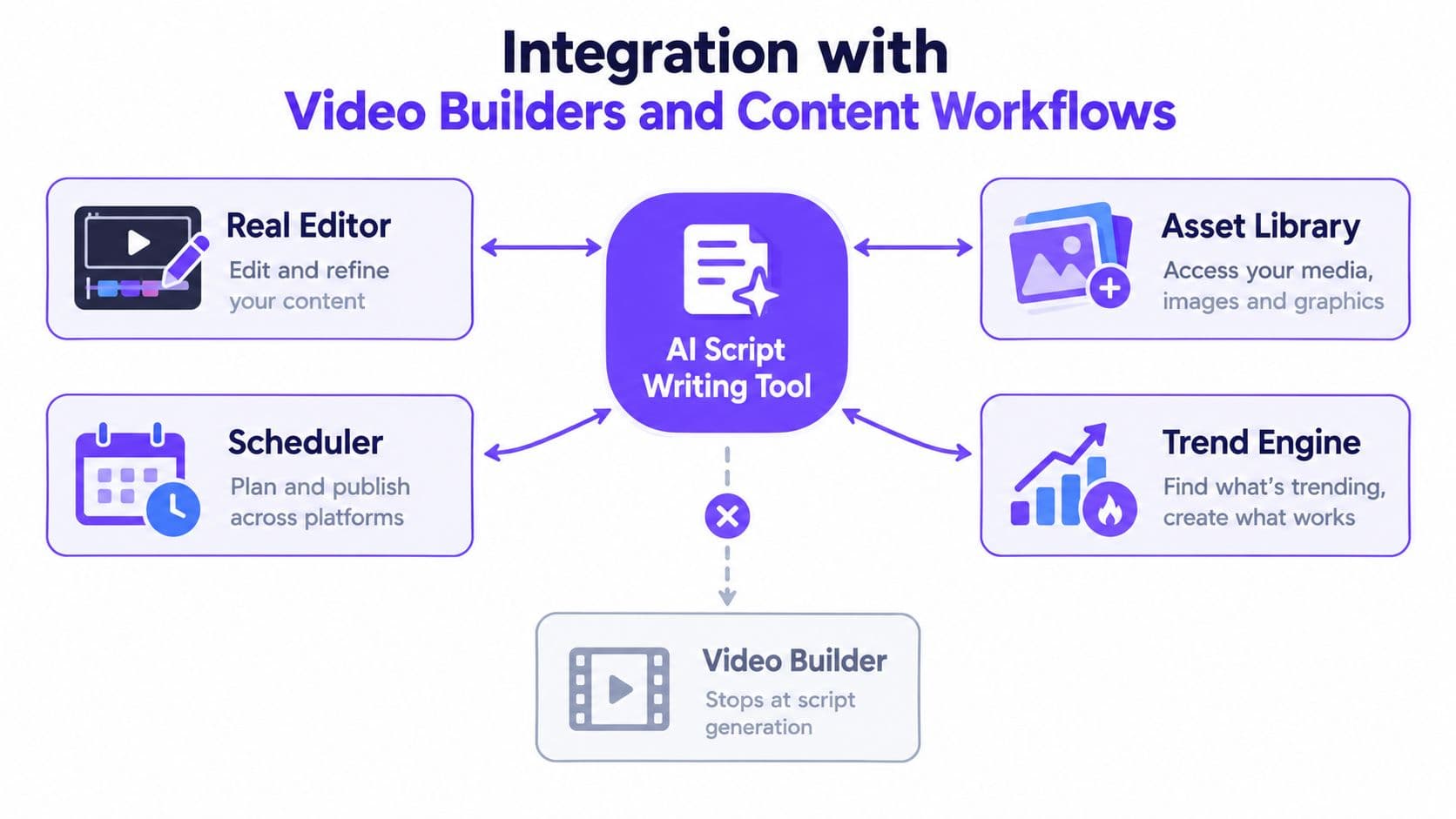
A script becomes valuable when it reaches production without being retyped. Map the handoff from brief to published asset and mark every manual transfer. If your team copies dialogue into an editor, rewrites captions, searches for B-roll, records a separate voiceover, and then rebuilds the publishing details, the script tool hasn't solved the full problem.
Score the handoff, not the demo
A polished generation screen tells you little about operations. Ask whether the tool can pass each component into the next system:
- Script structure: Dialogue, scene notes, captions, and CTAs remain separate.
- Editor access: The draft opens in a real video editor rather than a blank project.
- Asset guidance: The system suggests B-roll, visuals, avatars, or footage aligned with each beat.
- Audio production: Voiceover, pronunciation, and timing connect to the script.
- Caption timing: On-screen text follows the spoken structure without manual re-entry.
- Approval flow: Reviewers can comment, revise, and approve a version.
- Publishing: The finished asset moves toward the relevant social channels.
- Measurement: Performance data informs future hooks and formats.
CapCut and Adobe Express may fit teams that already have an established editing process, but the integration details matter more than the logo. Check whether the connection is direct, an export file, or a copy-and-paste routine described as an integration.
The same applies to schedulers and trend tools. A trend dashboard can help identify formats worth adapting, but it won't improve production if the team still rebuilds every video by hand. An API or webhook can matter for agencies routing approved scripts into a digital asset manager, project tracker, or custom approval system. Don't assume those connections exist. Ask for documentation and test one complete workflow.
Watch for the stranded-script failure
The silent failure happens after generation. The script looks good, the team approves it, and then nobody knows who owns the next step. Editors wait for assets. Creators reformat the copy. Social managers request a new version because the CTA wasn't separated. The original speed gain disappears in the handoff.
Give each candidate a pipeline score based on the number of steps it removes, the number of systems it connects, and the number of manual decisions it preserves. Favor the tool that makes a good script easier to ship, not the one that produces the most impressive isolated paragraph.
Pricing, Plans, and Scaling Beyond Your First Videos
Pricing pages often encourage the wrong comparison. A low entry price can hide limits on generations, seats, exports, rendering, storage, or automation. A team may choose a script-only plan and then discover that every finished video consumes a separate rendering allowance.
Treat the unit of cost as a finished video, not a generated paragraph. Your calculation should include the script generation, revisions, voiceover, rendering, stock assets, seats, storage, and publishing tools required to ship the asset.
Compare plans by output volume
A solo creator and an agency can use the same product very differently. A creator may value a low commitment and simple templates. An agency needs permissions, shared brand workspaces, approval controls, client separation, and predictable usage across campaigns.
| Tool | Starting price | Free tier | Billing model | Best for |
|---|---|---|---|---|
| Hooked | Check current plan page | Check current allowance | Review subscription and video limits | Social video workflows |
| Jasper | Check current plan page | Check current allowance | Review seat and usage terms | Brand-focused writing teams |
| Copy.ai | Check current plan page | Check current allowance | Review workspace and usage terms | Campaign and sales content |
| Writesonic | Check current plan page | Check current allowance | Review word, feature, and export limits | Mixed-format content teams |
Don't fill this table with remembered prices. AI products change packaging, quota definitions, and annual discounts frequently. Record the current terms during your evaluation and note whether the limit applies to words, generations, minutes, renders, or users.
Model three usage scenarios
Build a simple forecast for a light, moderate, and high-volume month. The exact figures depend on your workflow, so the model should answer these questions:
- How many drafts do you generate per finished video?
- How often do you regenerate a hook or CTA?
- Does rendering consume the same credit balance as writing?
- How many people need access?
- Do you pay for a separate editor or scheduler?
- What happens when you exceed the included allowance?
- Does an annual commitment reduce the effective rate?
- Can unused credits roll over?
Credit burn is particularly easy to underestimate. A team may generate several script variants, render multiple visual versions, and then create localized assets from the same campaign. A plan that feels inexpensive at low volume may become inefficient when revisions and rendering increase.
Choose the plan that keeps the cost predictable at your expected production level. If the vendor can't explain how a finished video consumes credits, treat that lack of clarity as a purchasing risk.
Matching the Right AI Script Writing Tool to Your Use Case
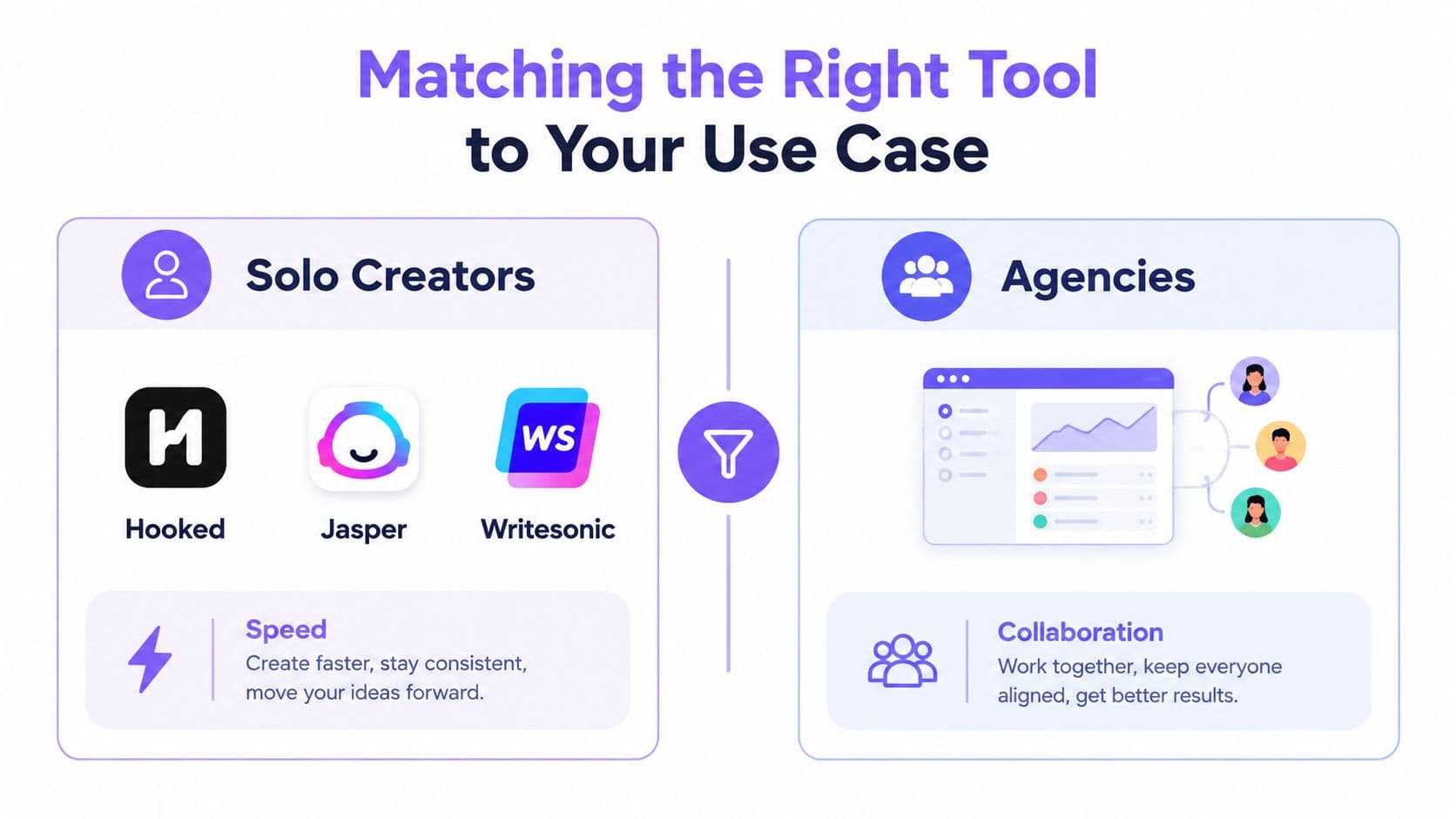
The right choice depends on where your workflow breaks. Don't buy an agency platform because it has more settings if you work alone. Don't buy a lightweight generator because its demo is fast if your team needs shared brand rules, approvals, and localized variants.
Solo creators need speed and usable structure
A creator publishing regular Reels, Shorts, or TikTok videos usually needs fast hooks, clear pacing, practical templates, and a direct route into editing. Hooked, Jasper, and Writesonic can suit this profile when the priority is moving from an idea to a recordable draft without building a complex content operation.
Decision rule: Choose the simplest tool that gives you strong format controls and leaves little cleanup before recording.
TikTok-first creators should test whether the tool understands vertical pacing, spoken hooks, captions, and visual beats. A general writing assistant may produce clear prose but still require you to convert that prose into a video structure.
Agencies need control more than novelty
Agencies managing multiple clients need separation between brand voices, reusable instructions, approval stages, and predictable collaboration. Writer or Anyword may be more appropriate when governance, controlled language, and team-wide consistency matter more than rapid experimentation.
Decision rule: Choose the platform that prevents one client's voice, claims, or terminology from leaking into another campaign.
The best agency workflow starts with a shared content brief and ends with an approved asset, not a folder full of unreviewed drafts. Test permissions and revision history with real users before signing up.
Performance teams should prioritize variation and production
Ecommerce teams producing paid UGC need repeatable hooks, product objections, creator directions, and CTA variants. AdCreative.ai and Predis.ai may fit teams that want campaign variation alongside creative production, but the evaluation should still focus on whether the output reaches a publishable asset efficiently.
Decision rule: Choose the tool that turns one approved product angle into structured, on-brand variations without multiplying manual editing.
Hooked's workflow follows the practical path many social teams need: choose a template, enter the hook idea, set the tone and length, generate variants, and move the selected draft into the video editor for rendering. Its broader platform includes script generation, video building, voiceovers, trend tracking, and scheduling, so assess the complete workflow rather than judging the script panel alone. For a more focused view of this process, use the AI video script generator overview.
The purchase decision is simple. If your bottleneck is blank-page ideation, prioritize generation speed. If your bottleneck is rewrites, prioritize voice and formatting. If your bottleneck is production, prioritize editor, asset, caption, and scheduler connections. The best AI script writing tool is the one that removes your actual constraint.
Hooked combines AI script generation with video creation, voiceovers, trend-aware workflows, and social publishing tools, so you can move from a tested idea to a finished asset without rebuilding the brief in another system. Visit Hooked to test whether its script-to-video workflow fits your content pipeline.