Tuesday through Thursday from 2 p.m. to 6 p.m. local time is the strongest overall TikTok posting window, but your own account data should override any generic schedule. The practical answer is to upload roughly 20–30 minutes before your audience's peak viewing window, then test that rule against your followers' actual behavior.
That sounds less definitive than “post at 6 p.m.,” but it's more accurate. A large 2026 analysis of 7 million TikTok posts found a strong midweek afternoon pattern, while other datasets have identified weekend mornings, weekend afternoons, early mornings, and evening periods as competitive. The disagreement isn't a flaw in the data. It shows that TikTok videos upload time and audience viewing time aren't interchangeable, and that no single global hour can serve every account.
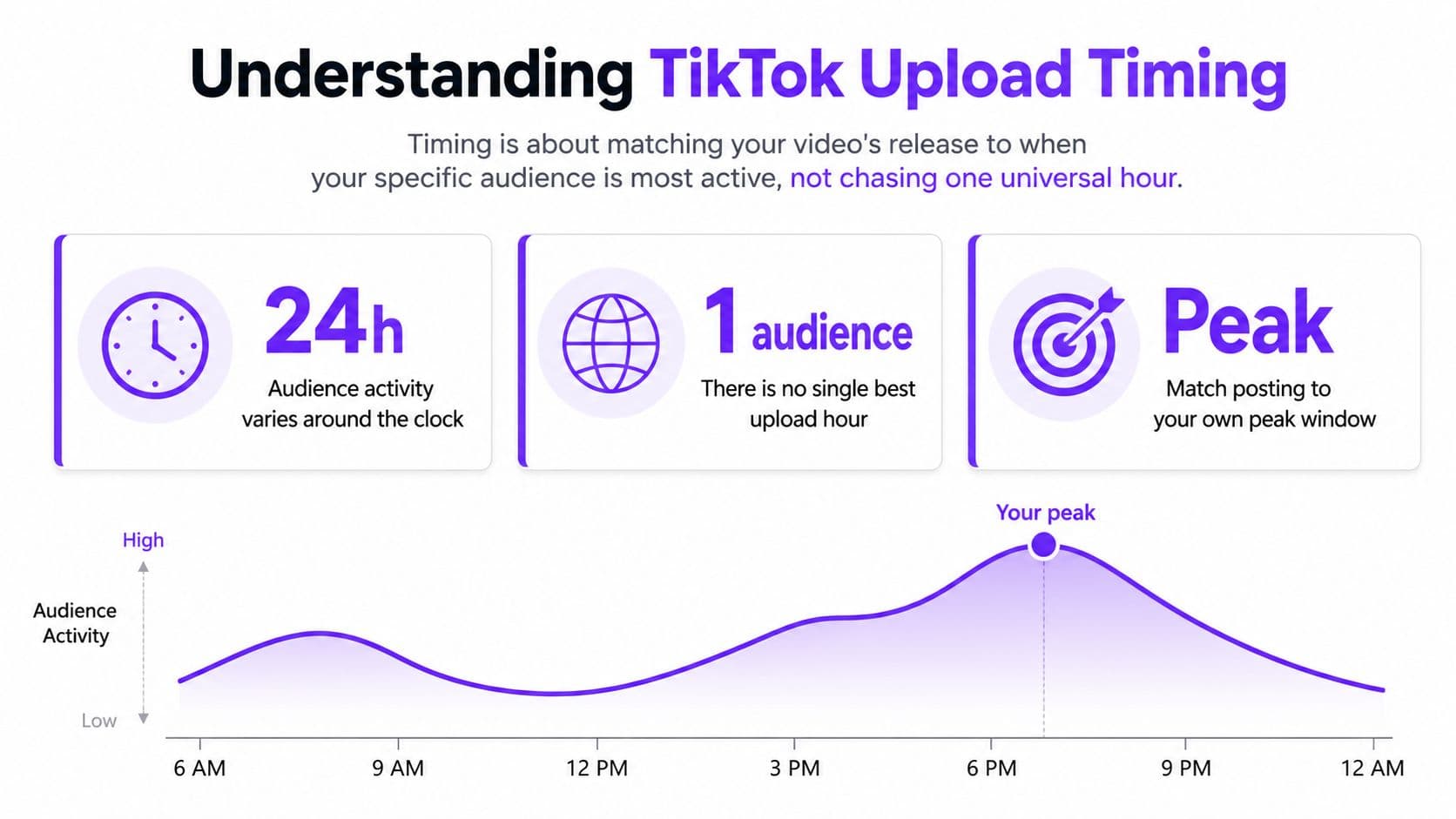
Understanding TikTok Upload Timing
The strongest broad benchmark currently points to Tuesday through Thursday, 2 p.m. to 6 p.m. local time, according to Buffer's analysis of 7 million TikTok posts. Sunday at 9 a.m., Monday at 1 p.m., and Sunday at 1 p.m. also ranked highly in that analysis.
That result gives creators a useful starting point, not a commandment. TikTok distributes videos through personalized feeds, so the relevant question isn't “What hour wins globally?” It's “When can this specific audience give the video its first meaningful burst of attention?”
That burst is engagement velocity, the speed at which viewers watch, like, comment on, share, or otherwise respond after publication. A video released while your followers are active has a better chance of collecting early signals than one released while most of them are unavailable. But the upload timestamp is only the beginning of the process. Viewers may see the video immediately, later in the day, or after TikTok expands its distribution.
Upload time is not viewing time
A creator who publishes at 6 p.m. isn't necessarily reaching every viewer at 6 p.m. TikTok can test a video with an initial group, then broaden distribution as people respond. That makes timing a probability exercise. You want the content available before the audience becomes active, while avoiding a long delay that leaves the initial audience asleep or distracted.
Practical rule: Treat broad timing studies as a shortlist of experiments. Treat your own activity data as the decision-maker.
The operational mistake is to optimize the clock while ignoring the creative. Timing can improve a video's starting position, but it can't repair a weak opening, unclear promise, or slow first few seconds. The best schedule is therefore the one that gives a strong video a timely first audience without consuming the creator's entire creative bandwidth.
Global Patterns vs Personal Analytics
Generic timing advice and account-specific analytics solve different problems. Broad studies help when an account lacks enough history to identify patterns. Personal analytics tell you whether your followers behave like the average audience in a dataset.
Adobe Express analyzed more than 21,000 TikToks from 160 creators and found that nearly 1 in 10 were posted at 6 p.m., making it the most common upload time in that sample, as described in this analysis of TikTok upload timing. That tells you when creators tend to publish, not necessarily when audiences respond most strongly.
The same analysis found that Saturday and Sunday posts received the most likes on average, while videos uploaded from 5:00 a.m. to 5:50 a.m. also performed well. The contrast matters. A crowded hour can be popular because many creators choose it, while a less obvious slot can attract strong engagement from a specific audience segment.
| Approach | What it gives you | Main limitation |
|---|---|---|
| Generic benchmark | A sensible starting schedule | It averages across different audiences and niches |
| Competitor observation | Clues about category habits | Competitor audiences may not match yours |
| Account analytics | Evidence about your followers | It reflects past behavior, not a permanent guarantee |
| Controlled testing | A way to compare your own slots | Creative differences can distort the result |
Popular does not mean optimal
A commonly used upload hour may also be a crowded publishing hour. That doesn't automatically make it bad, because TikTok evaluates each video on its own viewer response. It does mean you shouldn't confuse creator behavior with audience demand.
Use general findings to select a few candidate windows. Then compare those windows with your follower activity, audience locations, content format, and historical performance. If your audience is active early in the morning, an evening-only calendar follows convention rather than evidence. If your followers cluster at night, a morning slot may waste the first opportunity for interaction.
The better question isn't whether your account agrees with a global average. It's whether a consistent difference appears when you publish similar content in different windows.
Decoding Your Follower Activity Heatmap
TikTok Analytics gives creators a more useful starting point than a list of universal hours. Open your profile, enter TikTok Studio, select Analytics, and find the Followers area with the activity view. For a fuller walkthrough, use this guide to check analytics on TikTok.
Look for repeated concentration, not one isolated bright block. A single active period may reflect an unusual event or a particularly popular post. A recurring cluster across several days is more useful because it suggests a routine in your audience's behavior.
Read the heatmap as a scheduling signal
Start with the day. Identify whether activity rises on workdays, weekends, or both. Then inspect the hour. If the graph shows one dominant window, make it your primary test. If it shows several peaks, assign different content types to different periods instead of forcing every video into one slot.
A practical interpretation sequence looks like this:
- Find the strongest recurring period. Choose the day and hour with the clearest activity pattern.
- Mark a secondary window. This protects your schedule when the primary period conflicts with production or campaign needs.
- Account for local time. If followers live across regions, examine whether one window overlaps the largest audience groups.
- Compare against post results. Match publishing time with views, watch behavior, comments, shares, and follower actions.
- Recheck after audience changes. A growing account can develop a different activity pattern from the one that shaped its earlier data.
Don't treat the heatmap as a prediction of guaranteed reach. It tells you when followers tend to be present, not whether they'll care about the next topic. The heatmap answers when to offer the video. Creative testing answers whether the video deserves continued distribution.
The Strategic 30-Minute Lead Time
Publishing exactly at the audience peak can be less precise than it sounds. A technical benchmark recommends uploading approximately 20–30 minutes before the desired peak viewing window, because TikTok may test the video with a smaller cohort before expanding distribution. The same analysis estimates that timing contributes roughly 10–20% of initial performance lift, while content quality drives the majority of results, as detailed in this technical benchmark on TikTok posting time.
Consider a video intended for an audience that becomes active at 6 p.m. Uploading at 6 p.m. means the asset enters processing at the moment you want viewers to encounter it. Uploading earlier gives TikTok time to make the video available and collect initial responses before the main viewing window arrives.
Processing creates another timing variable
TikTok re-encodes every uploaded video on its servers. The delivery pipeline may show a lower-quality version while higher-resolution processing finishes, and one technical source reports that full 1080p commonly appears within 30 minutes to a few hours, although some uploads can remain degraded for up to 24 hours, according to this explanation of TikTok video compression and quality.
That matters most for large or high-bitrate files. A blurred first impression can make a polished asset look unfinished, particularly when the opening frame carries the hook or product demonstration. Uploading ahead of the intended audience window creates a buffer for processing rather than asking the platform to complete every technical step at the exact moment attention peaks.
This lead time isn't a substitute for scheduling discipline. It's a starting hypothesis. Test the same creative category at the recommended lead time, then compare it with an upload closer to the activity peak. Track whether early availability improves the first wave of viewing without assuming that every video follows identical processing behavior.
Debunking Evening Posting Myths
Evening posting is popular, but “always post at night” is too blunt to be useful. A 2026 analysis of 1,449 TikToks across 10 niches identified Saturday at 7 a.m. ET as the strongest slot in its sample, a result that directly contradicts the idea that evening is universally superior. The analysis also concluded that timing generally moved performance only from about the 50th to the 60th percentile, while the hook, first 3 seconds, captions, and length mattered more, according to this analysis of TikTok posting times across niches.

Timing is a marginal lever
That finding changes how creators should allocate effort. If the opening fails, moving the upload from morning to evening won't solve the central problem. If viewers leave before the video delivers its promise, a carefully selected timestamp won't compensate for weak pacing.
The practical hierarchy is straightforward:
- Hook: Give viewers a reason to continue immediately.
- First 3 seconds: Establish the promise before passive scrolling wins.
- Captions: Make the message easier to follow and retain.
- Length: Remove pauses and repetition that weaken completion.
- Timing: Place the finished asset where the right audience has a chance to respond.
This isn't an argument to ignore timing. It's an argument to stop overfunding it. A creator with limited hours should improve the opening before spending excessive energy debating a narrow difference between adjacent upload times.
Morning and midday windows deserve testing because they can align with different viewing routines. Weekend leisure, early-day browsing, and niche-specific habits can produce activity outside the familiar evening pattern. Use the clock to organize experiments, not to excuse weak creative.
Building a Consistent Weekly Calendar
A useful calendar combines one primary window, one secondary window, and deliberate creative variation. That structure keeps timing consistent enough to evaluate while preventing every upload from becoming a clone of the previous test.
Assign content by job rather than by a rigid daily formula. A trend-responsive video may need to go live while the trend is still relevant, even if the activity graph favors another hour. An evergreen educational video can wait for a tested audience window. A product demonstration may deserve the slot where viewers historically stay engaged long enough to understand the offer.
| Calendar role | Timing decision | Creative purpose |
|---|---|---|
| Primary slot | Use the strongest recurring follower activity period | Core educational, entertainment, or product content |
| Secondary slot | Use the next reliable activity window | Supporting themes and format variations |
| Flexible slot | Reserve for timely trends or reactive content | Speed matters more than perfect historical timing |
Build around production capacity
Batching reduces the temptation to publish whatever is finished. Prepare scripts, record related videos together, and separate production from release. Then schedule each asset according to the test window instead of allowing the editing process to dictate publication.
Keep a simple log with the planned time, actual upload time, content category, hook type, and early performance observations. This makes the calendar a learning system rather than a list of dates. If a slot repeatedly underperforms across comparable videos, replace it. If a secondary window produces promising responses, promote it into the next cycle.
Consistency also protects creative judgment. A sustainable calendar gives you room to reject weak ideas rather than rushing them into a supposedly perfect hour. The best schedule is one your team can maintain while still producing clear, distinctive videos.
Leveraging Automation and Scheduling Tools
Manual posting offers immediacy, but it also introduces avoidable failure points. A creator can miss a window, upload the wrong draft, forget a caption, or delay publication while handling another task. Scheduling tools shift the timing decision from a moment of stress to a planned production step.
Manual publishing versus scheduled release
| Manual workflow | Scheduled workflow |
|---|---|
| Requires someone to be available at the target time | Publishes according to the selected schedule |
| Makes last-minute changes easy | Encourages earlier review of the final asset |
| Can suit reactive trends | Works well for planned evergreen content |
| Depends on human attention | Reduces missed timing windows |
Automation does not remove the need for judgment. Someone still needs to check the hook, aspect ratio, caption, sound, account, and intended time zone. Scheduling ensures that a decision made in advance survives a busy day.
Cross-platform publishing adds another use case. A team can prepare a short-form asset once, then adapt its release across TikTok, Instagram Reels, and YouTube Shorts instead of manually coordinating each channel. The content still needs platform-specific review, but a shared calendar makes timing conflicts visible.
Hooked offers a scheduler for publishing and automating content across social platforms, including TikTok, Instagram, YouTube, and LinkedIn. Its relevance here is operational: creators can queue a finished video for a selected publish time while keeping the timing experiment separate from the act of remembering to post. For a practical workflow, follow this guide to schedule a TikTok post.
A 30-Day Testing Roadmap for Creators
A timing test should change one major variable at a time. If you move the upload hour, replace the hook, change the length, and switch the topic simultaneously, you won't know what caused the result.
Use the first phase to establish a baseline. Review your follower activity pattern, select a primary window and a secondary window, and record the performance of recent comparable posts. Include the actual upload time, not just the intended schedule, because processing and manual delays can create misleading comparisons.
The testing sequence
For the next phase, publish comparable content in the selected windows. Apply the 20–30-minute lead time before the audience peak, the operational rule supported by the technical benchmark cited earlier. Track view velocity, engagement rate, watch behavior, shares, comments, and follower actions, but interpret them alongside the quality of the creative.
A simple roadmap looks like this:
- Days 1–5: Confirm follower activity patterns and document the existing schedule.
- Days 6–12: Test the primary window with similar content categories.
- Days 13–18: Test the secondary window while keeping the creative standard consistent.
- Days 19–24: Compare the lead-time rule with a closer-to-peak upload.
- Days 25–27: Review results by content type, not only by overall account average.
- Days 28–30: Select a working schedule, document the reasoning, and reserve future slots for continued testing.
Don't declare a winner from one unusually strong or weak video. Look for a repeated pattern across comparable posts. The benchmark places timing at roughly 10–20% of initial performance lift, so timing should receive attention, but not at the expense of the hook, captions, length, and overall usefulness.
Run the experiment again when your audience, content mix, or distribution changes. A schedule is a working hypothesis, not a permanent property of the account.
Hooked helps creators turn trend and audience insights into ready-to-publish short-form videos, then schedule them across TikTok and other social platforms. Use Hooked to build a repeatable content queue, test upload windows with less manual work, and keep your creative time focused on stronger hooks and better videos.