Most advice on YouTube frequency is backwards. “Post more” sounds like a strategy, but it's only a production instruction. If publishing more often weakens your ideas, thumbnails, hooks, or editing, you may increase channel activity while making every individual upload less competitive.
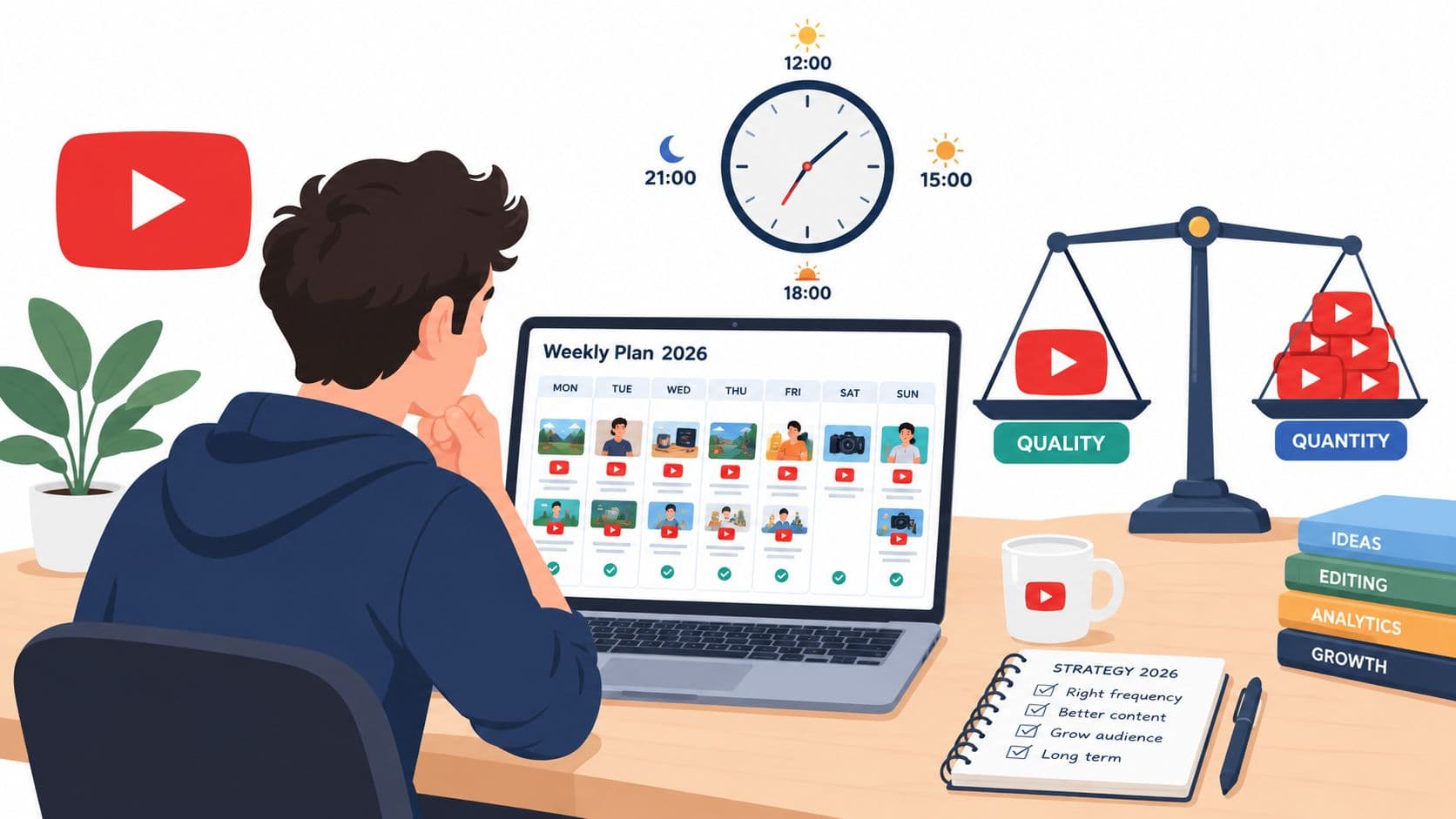
The better question is: how much total output can you sustain without lowering per-video quality? A creator who publishes two excellent videos each week can outgrow one who uploads five forgettable videos. YouTube gives each upload its own opportunity to earn clicks, watch time, and returning viewers. Volume creates more opportunities, but it doesn't rescue weak packaging or poor viewer satisfaction.
The Real Question Behind How Often You Should Post on YouTube
A large analysis of 2,565 upload gaps found no detectable relationship between a shorter gap and whether the next video became an early breakout. Channels that published more often accumulated more total views because they released more videos, but the shorter gap itself didn't make an individual upload more likely to break out, according to the analysis of posting gaps and YouTube performance.
That distinction changes the answer. More uploads can increase your total reach, learning opportunities, and subscriber acquisition. They don't automatically improve the performance of each upload. If your added videos receive weaker clicks or lose viewers quickly, your channel may produce more while teaching you less.
The practical rule: Increase output only when the next upload is good enough to stand beside the previous one.
“How often should you post on YouTube?” is really three questions:
- What can you produce repeatedly? Your answer depends on research, scripting, filming, editing, thumbnails, and audience interaction.
- Which format are you publishing? Shorts and long-form videos require different production systems and serve different roles.
- Which signals prove the cadence is working? Channel totals can rise only because you upload more. Per-video performance tells you whether the extra work is helping.
A sustainable cadence has three characteristics. It gives your audience a dependable reason to return, gives you enough repetitions to improve, and leaves enough time to make each upload useful. If you can't maintain all three, reduce frequency before quality starts falling.
The framework in this article is simple: choose a baseline, measure performance per video, add output gradually, and remove anything that lowers retention or weakens your ideas. For most new creators, that means starting with long-form publishing around once a week, then adding more only after the workflow feels routine.
What the Data Says About Upload Frequency and Channel Growth
The strongest evidence for publishing more often comes from a 2025 study of 10,210,278 YouTube channels. Channels uploading less than once a month had 0.53% median monthly view growth, while channels uploading 12 or more times per month reached 2.18% median monthly view growth and 0.91% median monthly subscriber growth. The highest-frequency group grew views about 4.1 times faster than the lowest-frequency group, and its median view growth was 2.45 times higher than channels uploading one to three times per month, as reported in vidIQ's YouTube upload frequency study.
That result supports a clear conclusion: moving from sporadic publishing to a repeatable multi-upload cadence can materially improve channel growth. It doesn't prove that uploading more causes every channel to grow, and it doesn't mean a creator should publish filler. The study measures a relationship between cadence and growth, not a guarantee for an individual channel.
| Upload frequency | Median view growth | Main trade-off |
|---|---|---|
| Less than once a month | 0.53% monthly | Low workload, weak momentum |
| One to three times a month | 0.89% monthly | More practice, limited publishing surface |
| Twelve or more times a month | 2.18% monthly | More opportunities, higher quality-control pressure |
The sensible beginner move is one strong long-form video per week. Independent frequency research found that increasing YouTube cadence beyond weekly publishing didn't materially improve engagement, while weekly publishing helped preserve audience attention and reduce production strain. For channels that can sustain more work, two to three uploads per week can be the next meaningful step for growth velocity, as summarized in Buffer's social media frequency guide.
A separate analysis of 189 YouTube channels found a median cadence of 2.7 uploads per week. The observed distribution clustered around weekly-to-multiple-times-per-week publishing, with 36.5% posting about two to four times weekly and 25.4% posting four or more times weekly, according to AIR Media-Tech's analysis of YouTube posting frequency. Treat that as a planning reference, not a commandment.
There's also a survivorship problem. Fast-posting channels that failed may disappear from the visible creator conversation, while successful high-volume channels remain easy to study. Use frequency data to choose a testable baseline, then judge your own channel by impressions, click-through rate, watch time, retention, and returning viewers per upload.
For timing and scheduling mechanics, use a dedicated guide to the best time to upload YouTube videos, but don't confuse a good publishing time with a sustainable publishing system. Timing can help a finished video reach viewers. It can't compensate for weak subject selection or an overloaded production calendar.
Five Factors That Change Your Ideal Posting Cadence
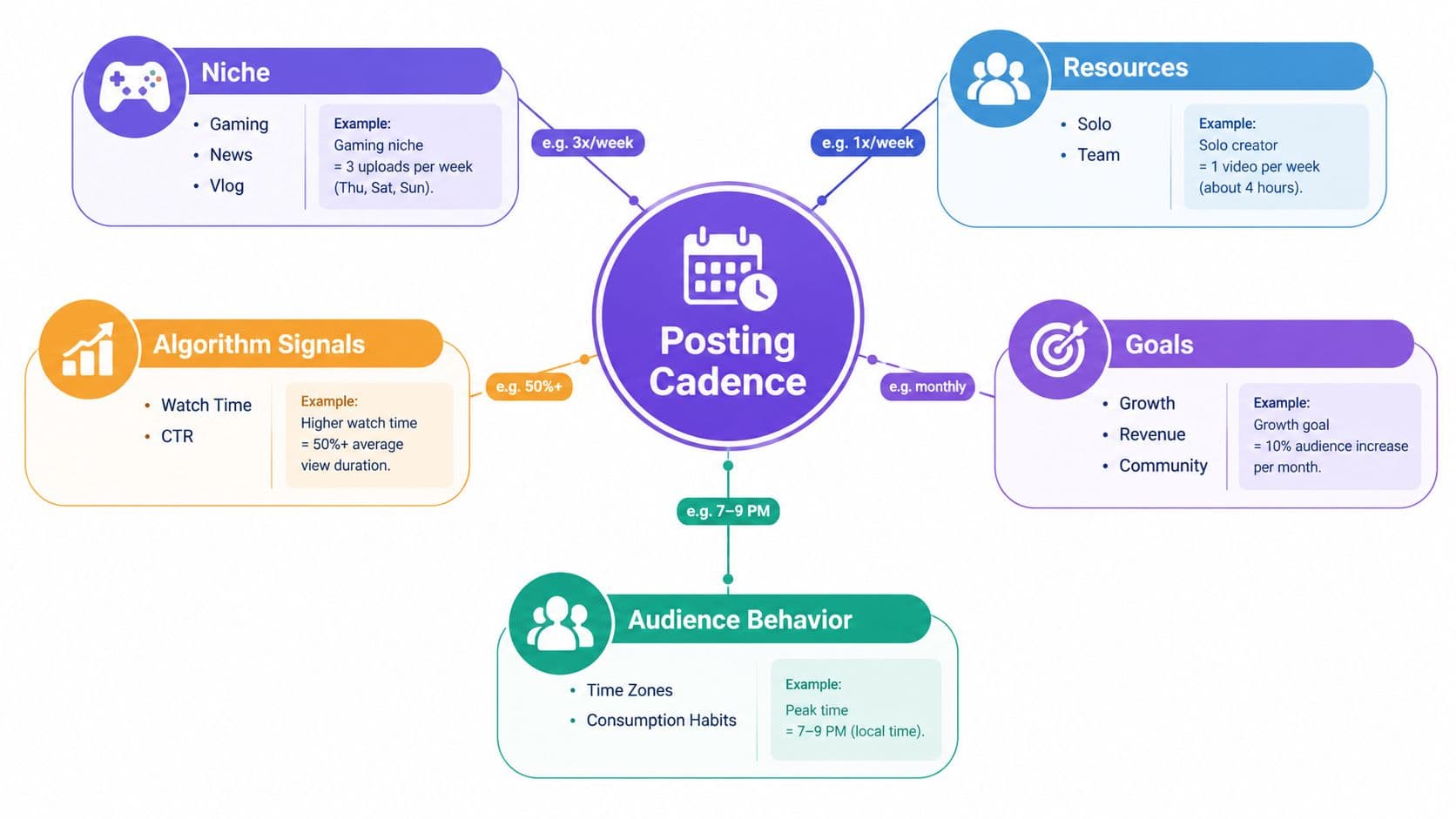
The right cadence isn't a universal number. It's the point where your channel can keep producing strong ideas without creating a quality deficit.
Niche
A gaming or news channel can respond to events, patches, launches, and conversations while interest is fresh. An evergreen education channel often needs deeper research, clearer demonstrations, and more deliberate editing. A reactive niche may support frequent uploads, while a tutorial channel may gain more from one authoritative video than several rushed explanations.
Audience
Audience expectations shape the acceptable rhythm. B2B viewers often have limited time and may prefer fewer, higher-stakes videos. Entertainment audiences may welcome frequent updates, especially when each upload offers a distinct premise. Look at when viewers return, not just when they click. If subscribers ignore recent uploads, more notifications won't solve the underlying mismatch.
Resources
A solo creator who researches, scripts, films, edits, designs thumbnails, and answers comments has a different ceiling from a team with dedicated editors. If your workflow consumes nearly every available evening, increasing cadence isn't ambitious. It's a warning that the system needs simplification, outsourcing, or a narrower format.
Production time
Animation, on-location filming, interviews, screen recordings, and talking-head tutorials all move at different speeds. Measure the complete cycle from idea selection to published video. A format that looks quick on camera may still require extensive research, asset gathering, editing, and review.
Retention metrics
Retention tells you whether your current output deserves more volume. Weak early retention usually points to a poor opening, unclear promise, or slow delivery. Fix the first minute before adding uploads. Strong retention gives you more confidence to test additional output, but it still doesn't excuse repetitive topics or declining viewer satisfaction.
Choose the bottleneck, not the benchmark. If ideas are the problem, publish less and research better. If editing is the problem, simplify the format. If packaging is the problem, spend more time on titles and thumbnails before adding another upload.
Start with the smallest cadence that gives you enough repetitions to learn. Keep it stable until you can identify which part of the workflow limits quality. Then solve that constraint instead of copying a schedule built for a different niche, team, or audience.
Shorts Versus Long-Form How the Cadence Rules Differ
Shorts and long-form videos shouldn't share one production calendar by default. A Short can test a single idea quickly, while long-form content must sustain attention through a much longer viewing session. The formats can support each other, but they need separate quality standards.
| Factor | YouTube Shorts | Long-form video |
|---|---|---|
| Primary job | Discovery, quick ideas, audience entry | Depth, trust, session value |
| Production approach | Repeatable clips and rapid testing | Research, structure, packaging, editing |
| Recommended starting point | A sustainable recurring stream | About one upload per week |
| Main risk | Volume without a clear audience promise | Rushed production and weak retention |
| Best connection | Point viewers toward a relevant theme | Give interested viewers a deeper experience |
Shorts can increase your surface area because each clip presents a separate opportunity to reach viewers. That doesn't mean you should flood the channel with unrelated clips. A Short about one subject may attract viewers who have no interest in your long-form content, leaving you with subscriber growth that doesn't translate into meaningful watch behavior.
Long-form videos deserve more deliberate spacing when the subject requires research or complex editing. A seven-day gap is not automatically better than a longer gap, but a rushed upload can damage the very signals that make the format valuable. Let the topic, production burden, and retention pattern determine whether you publish weekly or less often.
A mixed channel can work when the formats share a clear audience promise. Use Shorts to demonstrate a sharp insight, answer a narrow question, or preview a useful long-form idea. Then make the longer video a natural next step, not an unrelated upload that happens to share a channel page.
For practical guidance on creating and distributing the shorter format, use this resource on how to post YouTube Shorts. The important rule is balance: don't let a high-volume Shorts stream make your long-form library look disconnected or starve the videos that build deeper viewer relationships.
Example Weekly Schedules for Different Creator Types
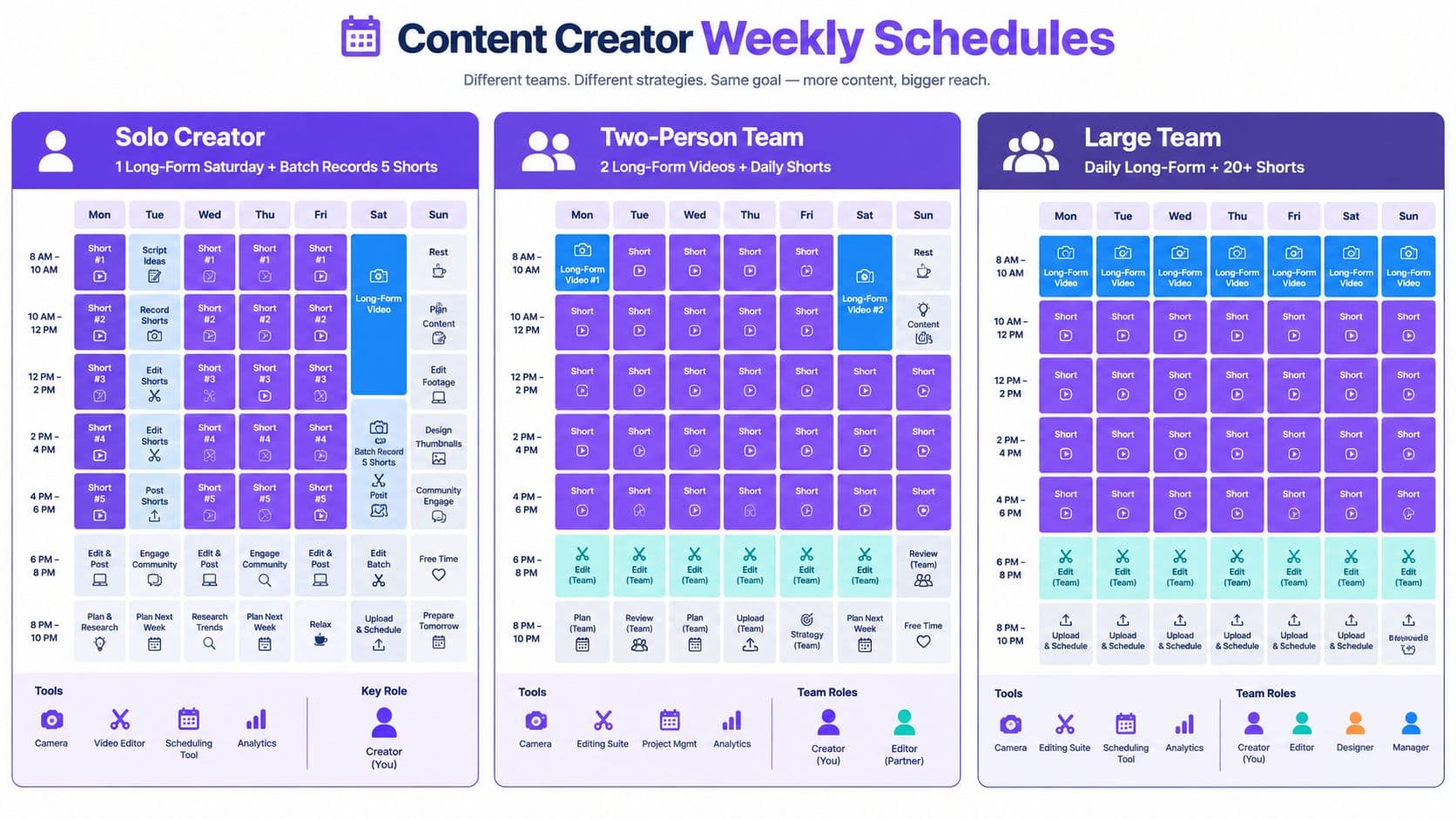
A schedule should tell you what happens on each day, not merely how many uploads you hope to publish. The examples below are operating patterns. Adapt the workload to your own production ceiling.
The solo specialist
Publish one long-form video on Saturday. Use Sunday for batch recording short clips from the same topic, then schedule those clips across the working week at a consistent audience-tested time. Weekday evenings go toward the next script, thumbnail concepts, comment replies, and research.
This schedule works because the long-form upload remains the main product. Short clips extend the topic without forcing you to invent a new concept every day. If recording and editing begin to crowd out research, remove the clips before weakening Saturday's video.
The faceless tutorial channel
Publish long-form tutorials on two fixed weekdays, such as Tuesday and Friday, only if the screen-recording and editing workflow can maintain clarity. Repurpose a useful segment from each tutorial for the following day, and keep the remaining days for research, thumbnail iteration, and audience questions.
The key advantage is modular production. A screen-recorded tutorial can be scripted around a repeatable problem-solving structure, while the short clip answers one narrow question from the same lesson. Don't use stock footage as decoration. Every visual should clarify the explanation or maintain attention.
The small brand team
A team with a writer, presenter, editor, and channel manager can run a fuller system. Use Monday for planning and review, Tuesday and Wednesday for filming, Thursday for editing and approvals, and Friday for publishing, clip extraction, community activity, and performance notes. Add a live session only when the team can moderate it and turn audience questions into future topics.
The brand should keep one owner for the editorial promise. More people can increase throughput, but they can also create inconsistent tone, duplicated topics, and slow approvals. The channel manager should maintain a single production board showing every idea, its audience, its format, its owner, and its next review date.
Exact publishing times should come from your audience's viewing patterns, not a generic calendar. Choose a time you can maintain, schedule in advance, and review performance by video rather than assuming that a busier calendar is automatically a better one.
Metrics to Watch and a Cadence Testing Framework
Treat frequency as an experiment, not a personality trait. A simple four-week test can show whether extra output improves the quality-adjusted performance of your channel.
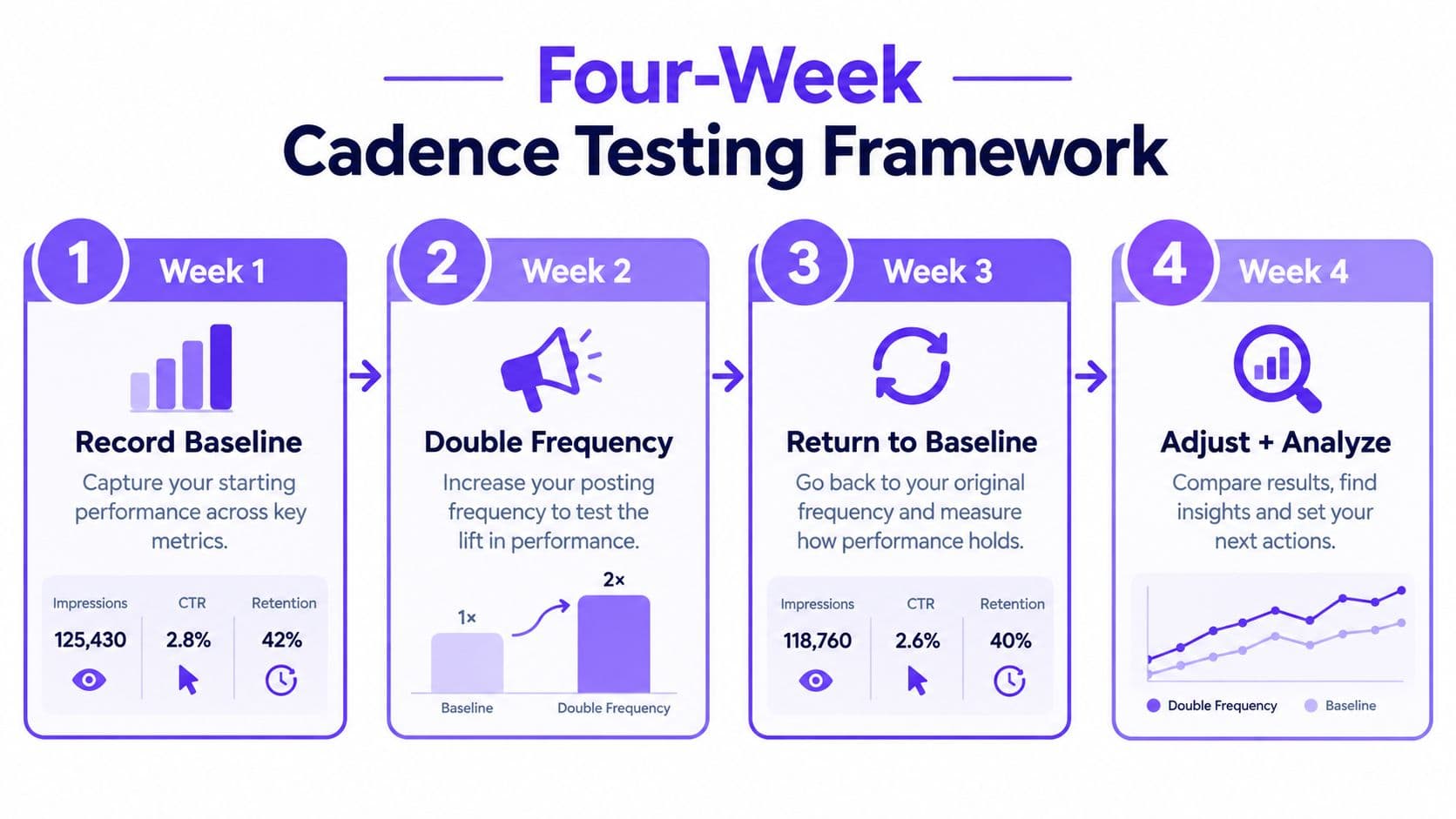
Week one, record the baseline
Log impressions, click-through rate, average view duration, retention, returning viewers, and subscribers gained for each upload. Record the format and topic as well. Without this baseline, a change in channel totals can look like success even when each video performs worse.
Week two, keep the system stable
Don't change the cadence and the packaging at the same time. Keep your publishing rhythm steady and note which topics, hooks, thumbnails, and traffic sources produce the strongest response.
Week three, add one variable
Add one extra upload, either a Short or a long-form video, depending on the bottleneck you're testing. Keep the topic quality, thumbnail process, format, and publishing approach as consistent as possible. The point is to isolate the effect of added output.
Week four, compare per-video results
Compare the new cadence with the baseline using performance per video. If average view duration, retention, or returning-viewer behavior weakens noticeably, revert and fix production quality. If impressions per video decline across repeated tests, investigate topic selection and packaging before blaming frequency.
The correct question isn't “Did the channel get more views?” A higher upload count can raise total views by arithmetic alone. Ask whether the additional work improved the average quality of your opportunities.
Use a spreadsheet with one row per upload. Track the idea, format, publish date, impressions, click-through rate, average view duration, retention, returning viewers, and subscribers gained. Change one variable at a time, keep notes on production effort, and stop any cadence that requires filler.
Scaling Output With Batching Repurposing and AI Workflows
Scaling frequency is a production problem before it's a posting problem. Creators who record one video from start to finish before beginning the next often waste time switching between research, filming, editing, and publishing. Batching groups similar tasks and makes a higher cadence easier to evaluate.
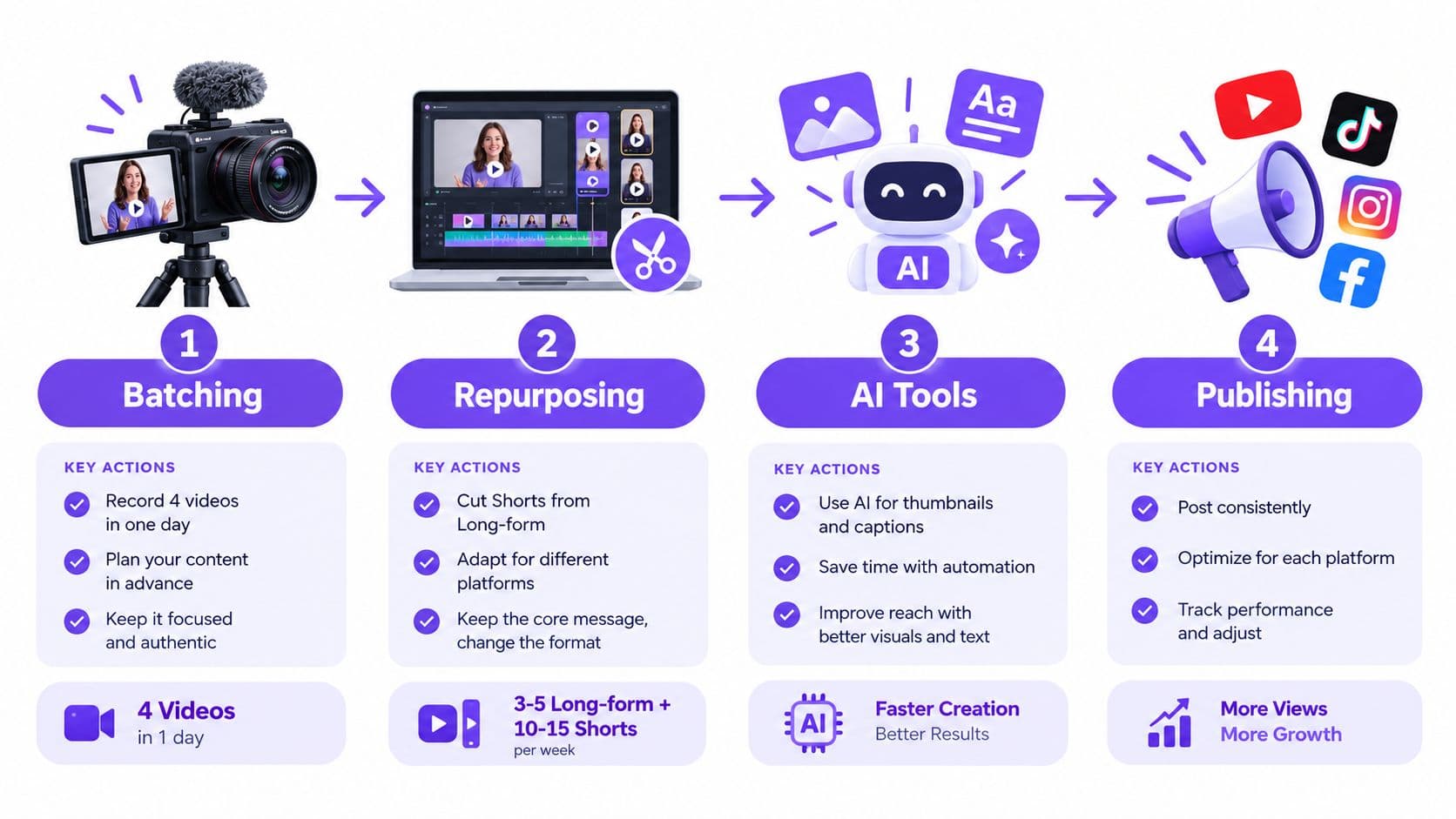
A practical pipeline looks like this:
- Batch the ideas. Choose related subjects, write the hooks, and outline the videos in one planning block.
- Batch the recording. Keep the same camera, lighting, framing, and sound setup for a group of videos.
- Repurpose deliberately. Extract clips only when they make sense as standalone ideas. Add a clear opening rather than cutting randomly from the middle.
- Publish from a calendar. Queue the finished assets, then reserve time for comments, analytics, and revisions.
A single tutorial can become a long-form upload, several focused Shorts, community prompts, and a newsletter section when every derivative asset answers a different viewer question. The original video remains the source of authority. Repurposing should multiply useful entry points, not make the audience watch the same segment repeatedly.
AI tools can help with transcription, clip detection, captions, title variations, and first-draft descriptions. They don't replace editorial judgment. Review every generated hook for accuracy, remove repetitive clips, and make sure the thumbnail promise matches the actual video. Teams comparing automation platforms may find this comparison of AI tools for SEO useful when building a broader content workflow.
For a more detailed operating system, see how to scale content creation. A scheduler such as Hooked can organize and automate video delivery across platforms, including YouTube Shorts, while trend tracking, competitor monitoring, analytics, and AI-assisted video creation can support a repeatable publishing workflow. Use those capabilities to remove repetitive work, not to justify publishing content your audience doesn't need.
Your time budget should protect the highest-value tasks first. Reserve the most attention for topic selection, the opening hook, and final quality control. Automate or delegate transcription, caption formatting, clip selection, and scheduling when those tasks consume time without improving the idea.
Frequently Asked Questions About YouTube Posting Frequency
Does deleting an underperforming video hurt your channel?
Deleting a weak video removes its future opportunity to collect views, search traffic, and viewer feedback. Don't delete an upload just because its first results disappoint you. Improve the title or thumbnail when appropriate, and reserve deletion for videos that are inaccurate, off-brand, legally risky, or damaging to the audience promise.
Do Shorts count toward the YouTube Partner Program watch-time route?
Shorts and long-form videos are measured through different viewing systems, so Shorts feed views don't substitute for the public watch-hour requirement used by the long-form route. Check the current YouTube Partner Program rules before planning monetization around one format.
Is daily posting sustainable?
Daily publishing is sustainable only when the format, ideas, and review process can support it without quality decay. If daily uploads create weaker hooks, repetitive subjects, or declining retention, reduce the cadence and rebuild the workflow.
Should you publish at the same time every day?
A consistent time makes scheduling easier and gives your audience a predictable routine, but it isn't a substitute for strong topics and packaging. Test a practical time against your audience data, then keep it stable long enough to make a useful comparison.
What happens if you stop posting for a few weeks?
A break can slow momentum because you create fewer opportunities to reach viewers, but it doesn't permanently define the channel. Return with a strong, relevant upload rather than rushing out several weak videos. Batch and schedule content before a planned absence when possible.
Can you publish more than once per day?
You can, but separate uploads need distinct reasons to exist. Multiple daily posts make more sense for reactive formats or Shorts than for research-heavy long-form videos. If the second upload competes with the first or lowers quality, the extra slot isn't worth keeping.
Creators and brands also need to assess collaborators, sponsors, and channel partners carefully. A useful guide to creator vetting on YouTube can help teams evaluate fit beyond surface-level subscriber counts. If your own results are unusual, return to the cadence testing framework and change one variable at a time.
Hooked helps creators and brands turn a sustainable content cadence into a repeatable workflow with AI video creation, trend tracking, analytics, and scheduling for platforms including YouTube Shorts. Visit Hooked to build a publishing system that increases output without sacrificing the quality your audience came for.